

On this page
How do I check my Windows 11 version?Check it from the command lineWhich versions still get security updates?What is Windows 11 version 26H2?How to upgrade from 24H2 or 25H2How to upgrade from 23H2 or olderIf something goes wrongFAQ- Press Win + R, type
winverand press Enter — the window shows your version (for example 25H2) and build. - The current release is 26H2 (build 26300). On Home and Pro, 24H2 and 23H2 no longer get security updates.
- From 24H2 or 25H2, upgrade in Settings → Windows Update: a small download and one restart, files and apps kept.
How do I check my Windows 11 version?
The fastest way works on every edition:
- Press Win + R.
- Type
winverand press Enter. - Read the second line: Version 25H2 (OS Build 26200.xxxx) or similar.
You can also open Settings → System → About and look under Windows specifications. It lists the edition (Home, Pro), the version and the OS build, and has a Copy button if someone asks you for the details.
Check it from the command line
Handy when you're helping someone remotely or checking several PCs. In Windows Terminal or PowerShell, this prints just the version name:
(Get-ItemProperty 'HKLM:\SOFTWARE\Microsoft\Windows NT\CurrentVersion').DisplayVersion
For the full build number, cmd /c ver prints a line such as 10.0.26300.10075. The third number is the build — the table below tells you which version it belongs to.
Which versions still get security updates?
Microsoft supports each Windows 11 release for 24 months on Home and Pro and 36 months on Enterprise and Education. After that a PC stops receiving security fixes until it moves to a newer version.
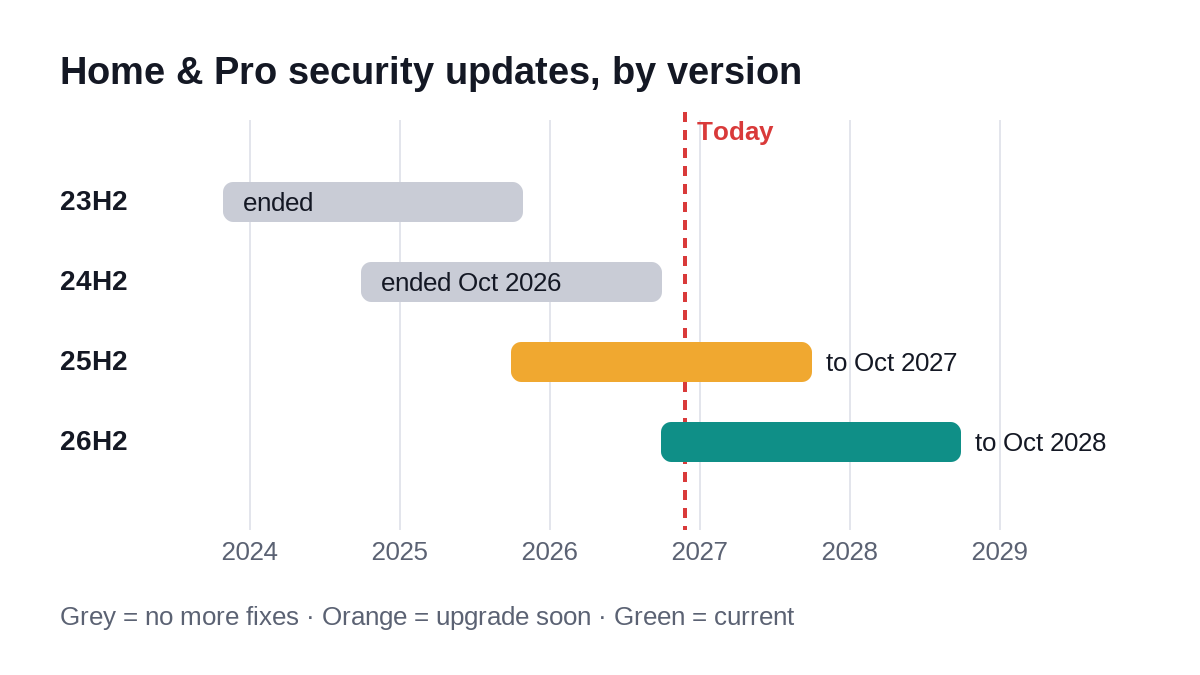
| Version | Build | Home / Pro status | What to do |
|---|---|---|---|
| 26H2 | 26300 | Supported until 10 Oct 2028 | Nothing — keep updating monthly |
| 26H1 | 28000 | Supported until 14 Mar 2028 | Nothing — only on some new 2026 PCs |
| 25H2 | 26200 | Supported until 12 Oct 2027 | Upgrade when convenient |
| 24H2 | 26100 | Ended 13 Oct 2026 | Upgrade now |
| 23H2 | 22631 | Ended | Upgrade now (full update) |
Enterprise and Education editions get an extra year: 24H2 is supported there until 12 October 2027.
What is Windows 11 version 26H2?
Version 26H2, which Microsoft also calls the Windows 11 2026 Update, became available on 29 September 2026. It shares its code base with 24H2 and 25H2, so most of its features already arrived through monthly updates; the upgrade simply switches them on and restarts the two-year support clock.
Since late October every eligible PC can get it by checking for updates manually, and from 18 November Microsoft began offering it automatically to home PCs on 24H2 and 25H2, in gradual waves.
26H1 is the exception. It's a separate branch that ships only on certain new devices released in 2026. It isn't offered to existing PCs, and PCs on 26H1 can't move to 26H2 — they stay on 26H1, which is supported until March 2028.How to upgrade from 24H2 or 25H2
- Save your work and plug a laptop into power.
- Open Settings → Windows Update.
- Turn on Get the latest updates as soon as they're available.
- Select Check for updates.
- When Windows 11, version 26H2 appears, select Download and install.
- Restart when asked, then run
winveragain to confirm.
Because it's an enablement package, it installs like a monthly update: a small download and a single restart, usually within a few minutes. Your files, apps and settings stay as they are.
How to upgrade from 23H2 or older
A 23H2 PC needs a full feature update rather than the small package, so expect a much larger download, several restarts and a longer wait. Check first that you have enough free space — our guide to freeing up disk space on Windows 11 helps if the drive is nearly full.
If Windows Update doesn't offer a newer version, Microsoft's Windows 11 download page has the Installation Assistant, which upgrades the PC in place and keeps your files and apps. Make a backup before any full upgrade; see backup and recovery software for free options.
If something goes wrong
| Problem | Fix |
|---|---|
| 26H2 isn't offered | Install all pending updates, restart and check again. Microsoft holds the upgrade back on PCs with a known compatibility issue until it's fixed. |
| PC is on 26H1 | Nothing to do — 26H2 isn't available for it, and 26H1 is still supported. |
| Update fails with an error code | Restart, then select Check for updates again. If the same code keeps appearing, search it on Microsoft's support site. |
| Not enough space | Free a few GB (more for a full update from 23H2) and try again. |
| Something misbehaves after upgrading | Update drivers and apps first, then check Microsoft's 26H2 known-issues page (in the sources below). |
After the upgrade, bring your programs up to date too — one WinGet command updates most of them at once.
Apps mentioned
 Windows Terminal
 PowerShell 7
Frequently asked questions
What is the latest version of Windows 11?
Version 26H2 (the Windows 11 2026 Update, build 26300), released on 29 September 2026.
Does upgrading to 26H2 delete my files or apps?
No. From 24H2 or 25H2 it installs like a monthly update and keeps your files, apps and settings.
Is Windows 11 24H2 still supported?
Not on Home and Pro: the October 2026 security update was the last one. Enterprise and Education editions are supported until 12 October 2027.
Why can't I get 26H2 on my new PC?
It is probably running 26H1, which comes only on some 2026 devices and can't be upgraded to 26H2. It is supported until March 2028.


