

On this page
When do Windows 10 updates end now?What ESU gives you — and what it doesn'tCan your PC get ESU?How to enroll (and what it costs)How to check that it workedUse the extra year to plan your moveDon't forget your appsFAQ- Enrolled Windows 10 PCs now get security updates until 12 October 2027 — a year longer than planned.
- Already enrolled? You don't need to do anything. Not enrolled? Do it in Settings → Update & Security → Windows Update.
- ESU is security fixes only. Use the extra year to move to Windows 11 or a new PC calmly.
When do Windows 10 updates end now?
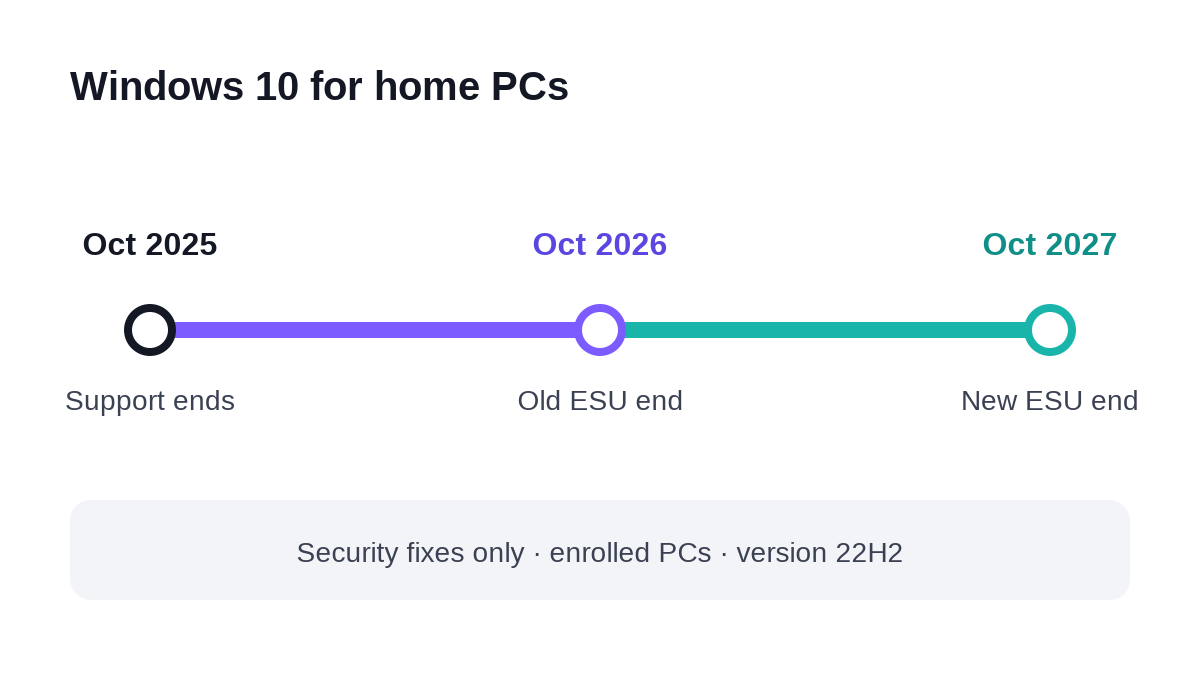
Windows 10 reached end of support on 14 October 2025. Since then, only PCs enrolled in the consumer Extended Security Updates (ESU) programme receive security patches.
ESU was first meant to stop on 13 October 2026. In June 2026 Microsoft extended it by a year, so enrolled PCs are now covered until 12 October 2027. If your PC was already enrolled, the extra year is applied automatically.
What ESU gives you — and what it doesn't
ESU is a safety net, not full support. You get critical and important security fixes through Windows Update, and nothing else:
- No new features or design changes
- No routine bug fixes that aren't security-related
- No technical support from Microsoft
That makes an enrolled PC reasonably safe for everyday browsing, email and documents. It won't get faster or gain features, and some apps and games will gradually drop Windows 10 support.
Can your PC get ESU?
Consumer ESU is for home PCs running Windows 10 version 22H2 in the Home, Pro, Pro Education or Pro for Workstations editions. You need an administrator account and you'll be asked to sign in with a Microsoft account during enrollment.
To check your version, press Win + R, type winver and press Enter. If it shows an older version than 22H2, install the pending updates in Windows Update first.
How to enroll (and what it costs)
- Open Settings → Update & Security → Windows Update.
- Select Enroll now next to the Extended Security Updates message. If you don't see it, install all pending updates and restart.
- Sign in with your Microsoft account if asked.
- Choose one of the enrollment options and finish the wizard.
Outside Europe, Microsoft offers three options: sync your PC settings with Windows Backup (no extra cost), redeem 1,000 Microsoft Rewards points, or a one-time purchase of $30 (or the local equivalent). One ESU licence can cover up to 10 devices on the same Microsoft account.
In the European Economic Area, enrollment is free without the backup or Rewards conditions, but you need to stay signed in with your Microsoft account.
Only enroll through Windows Settings. Websites or callers selling “Windows 10 security update” subscriptions are scams.
How to check that it worked
Go back to Settings → Update & Security → Windows Update. An enrolled PC shows a message saying it's enrolled in Extended Security Updates, and monthly security updates keep arriving on Patch Tuesday (the second Tuesday of each month).
Use the extra year to plan your move
October 2027 will come faster than it seems. Decide now what happens to this PC:
| Your situation | Best next step |
|---|---|
| PC is compatible with Windows 11 | Upgrade for free through Windows Update at a quiet moment — after a backup. |
| PC isn't compatible | Keep it on ESU, and budget for a replacement before October 2027. |
| Old PC you rarely use | Keep it offline or for non-sensitive tasks; avoid banking on it after ESU ends. |
Check compatibility with Microsoft's PC Health Check app. Windows 11 needs a supported processor (broadly Intel 8th generation, AMD Ryzen 2000 series or newer), TPM 2.0 and Secure Boot.
Don't forget your apps
Windows updates only protect Windows. Browsers, PDF readers, archivers and media players need updates too, and outdated apps are a common way in for attackers. You can update most of them with one command — see how to update all your apps at once with WinGet.
When you eventually move to Windows 11 or a new PC, back up your files and reinstall apps from a short list rather than copying years of clutter. Our reinstall checklist and the free InstallHub installer make that part quick.
Apps mentioned
 Microsoft Edge
 Mozilla Firefox
 Macrium Reflect
 OneDrive
Frequently asked questions
When do Windows 10 security updates end now?
For PCs enrolled in consumer ESU, on 12 October 2027.
Do I need to re-enroll to get the extra year?
No. PCs already enrolled get the extension automatically.
Is Windows 10 ESU free?
It can be: sync settings with Windows Backup or redeem 1,000 Rewards points. Otherwise it's a one-time $30. In the EEA it's free.
Is it safe to keep using Windows 10 without ESU?
Not for sensitive tasks — new vulnerabilities stay unpatched. Enroll in ESU or move to Windows 11.


